# Claude Dev
Download VSCode Extension
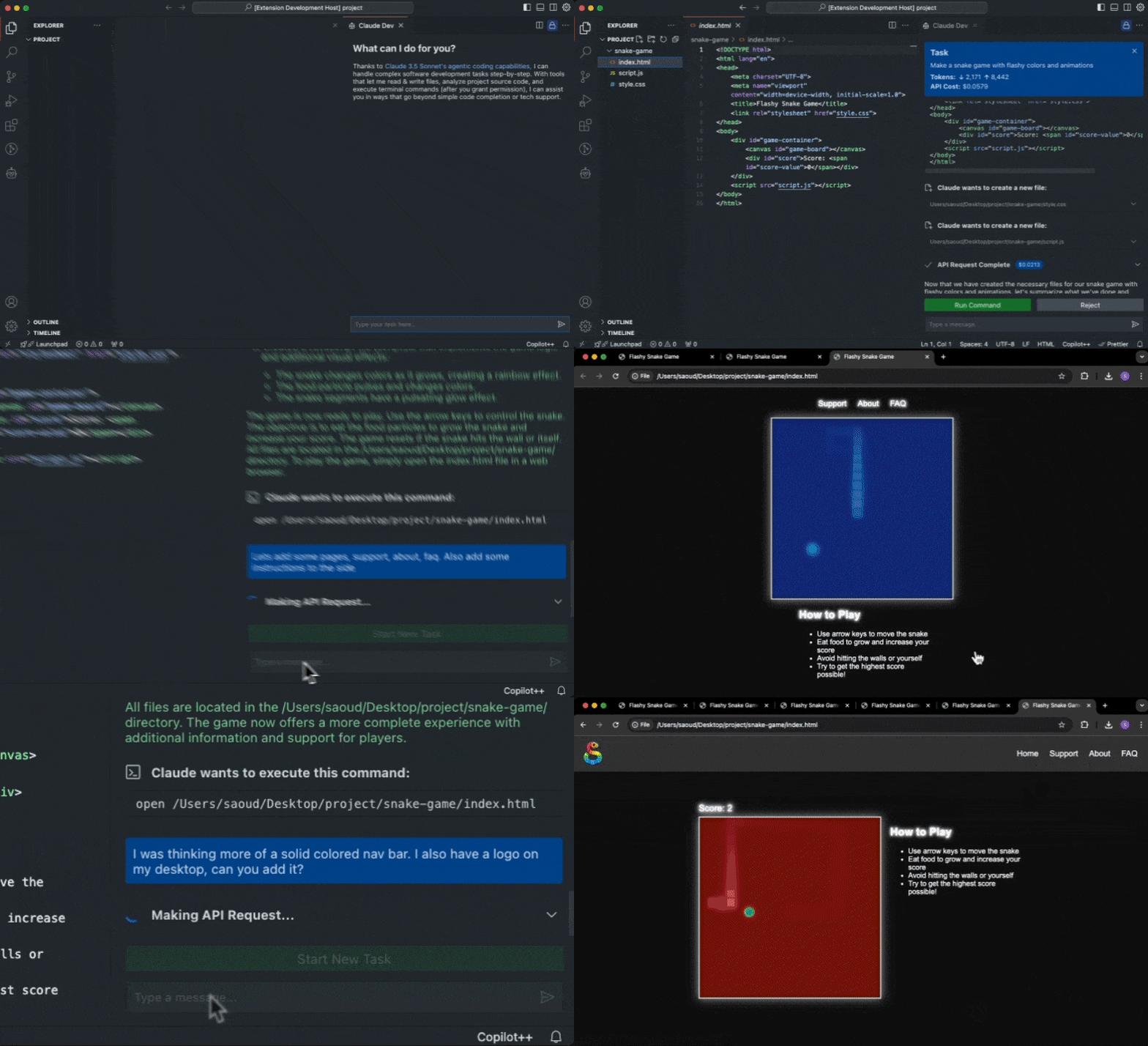
Thanks to [Claude 3.5 Sonnet's agentic coding capabilities](https://www-cdn.anthropic.com/fed9cc193a14b84131812372d8d5857f8f304c52/Model_Card_Claude_3_Addendum.pdf) Claude Dev can handle complex software development tasks step-by-step. With tools that let him create & edit files, explore complex projects, and execute terminal commands (after you grant permission), he can assist you in ways that go beyond simple code completion or tech support. From building software projects to running system operations, Claude Dev is only limited by your imagination.
While autonomous AI scripts traditionally run in sandboxed environments, Claude Dev provides a human-in-the-loop GUI to supervise every file changed and command executed, providing a safe and accessible way to explore the potential of agentic AI.
- Paste images in chat to use Claude's vision capabilities and turn mockups into fully functional applications or fix bugs with screenshots
- Inspect diffs of every change Claude makes right in the editor, and keep track with syntax highlighted previews in chat
- Runs terminal commands directly in chat, so you never have to open a terminal yourself (+ respond to interactive commands by sending a message)
- Presents permission buttons (i.e. 'Approve terminal command') before tool use or sending information to the API
- Keep track of total tokens and API usage cost for the entire task loop and individual requests
- Set a maximum # of API requests allowed for a task before being prompted for permission to proceed
- When a task is completed, Claude determines if he can present the result to you with a terminal command like `open -a "Google Chrome" index.html`, which you run with a click of a button
_**Pro tip**: Use the `Cmd + Shift + P` shortcut to open the command palette and type `Claude Dev: Open In New Tab` to start a new task right in your editor._
## How it works
Claude Dev uses an autonomous task execution loop with chain-of-thought prompting and access to powerful tools that give him the ability to accomplish nearly any task. Start by providing a task and the loop fires off, where it might use certain tools (with your permission) to accomplish each step in its thought process.
### Tools
Claude Dev has access to the following capabilities:
1. **`execute_command`**: Execute terminal commands on the system (only with your permission, output is streamed into the chat and you can respond to stdin or exit long-running processes when you're ready)
2. **`list_files_top_level`**: List all paths for files at the top level of the specified directory (useful for generic file operations like retrieving a file from your Desktop)
3. **`list_files_recursive`**: List all paths for files in the specified directory and nested subdirectories (excludes files in .gitignore)
4. **`view_source_code_definitions_top_level`**: Parses all source code files at the top level of the specified directory to extract names of key elements like classes and functions (see more below)
5. **`read_file`**: Read the contents of a file at the specified path
6. **`write_to_file`**: Write content to a file at the specified path, automatically creating any necessary directories
7. **`ask_followup_question`**: Ask the user a question to gather additional information needed to complete a task (due to the autonomous nature of the program, this isn't a typical chatbot–Claude Dev must explicitly interrupt his task loop to ask for more information)
8. **`attempt_completion`**: Present the result to the user after completing a task, potentially with a terminal command to kickoff a demonstration
### Working in Existing Projects
Developers tend to name directories, files, classes, functions, and other components in ways that reflect their purpose and role within the larger system. These names often encapsulate high-level concepts and relationships that are crucial for understanding a project's overall architecture.
Claude Dev leverages the fact that large language models are fundamentally built on natural language processing, and by focusing on these named elements we provide the LLM with a structural understanding of the codebase that aligns closely with how developers conceptualize and organize their code. By effectively extracting the "language" of the codebase, we enable the LLM to grasp structure and intent without wasting context on implementation details.
1. **File Structure**: Claude first uses the `list_files_recursive` tool to get a complete picture of the project's file structure. It turns out Claude 3.5 Sonnet is _really_ good at inferring what it needs to process further just from these file names alone.
2. **High-Level Code Overview**: Claude may then use the `view_source_code_definitions_top_level` tool on specific directories of interest. This tool uses [tree-sitter](https://github.com/tree-sitter/tree-sitter) to parse source code with custom tag queries that extract names of classes, functions, methods, and other definitions. `view_source_code_definitions_top_level` works by first identifying source code files that tree-sitter can parse (currently supports `python`, `javascript`, `typescript`, `ruby`, `go`, `java`, `php`, `rust`, `c`, `c++`, `c#`, `swift`), then parsing each file into an abstract syntax tree, and finally applying a language-specific query to extract definition names (you can see the exact query used for each language in `src/parse-source-code/queries`). The results are formatted into a concise & readable output that Claude can easily interpret to quickly understand the code's structure and purpose.
3. **Read Relevant Files**: With the insights gained from the project file structure and high-level code overview, Claude can then use the `read_file` tool to examine specific files that are most relevant to the task at hand.
By carefully managing what information is added to context, Claude can provide valuable assistance even for complex, large-scale projects without overwhelming its context window (200k tokens, translating to roughly 150k words or about 500 pages of a typical book).
### Only With Your Permission
Claude always asks for your permission first before any tools are executed or information is sent back to the API. This puts you in control of this agentic loop, every step of the way.

## Contribution
Paul Graham said it best, "if you build something now that barely works with AI, the next models will make it _really_ work." I've built this project with the assumption that scaling laws will continue to improve the quality (and cost) of AI models, and what might be difficult for Claude 3.5 Sonnet today will be effortless for future generations. That is the design philosophy I'd like to develop this project with, so it will always be updated with the best models, tools, and capabilities available–without wasting effort on implementing stopgaps like cheaper agents. With that said, I'm always open to suggestions and feedback, so please feel free to contribute to this project by submitting issues and pull requests. Contributions are welcome and appreciated!
To build Claude Dev locally, follow these steps:
1. Clone the repository:
```bash
git clone https://github.com/saoudrizwan/claude-dev.git
```
2. Open the project in VSCode:
```bash
code claude-dev
```
3. Install the necessary dependencies for the extension and webview-gui:
```bash
npm run install:all
```
4. Launch by pressing `F5` to open a new VSCode window with the extension loaded
## Reviews
- ["Claude Sonnet 3.5 Artifacts in VSCode With This Extension"](https://www.youtube.com/watch?v=5FbZ8ALfSTs) by [CoderOne](https://www.youtube.com/@CoderOne)
- ["ClaudeDev: NEW Coding Agent Can Generate Applications within VS Code!"](https://www.youtube.com/watch?v=UNsQHosbIoE) by [WorldofAI](https://www.youtube.com/@intheworldofai)
- ["Claude Dev: This Coding Agent can Generate Applications Within VS Code!"](https://www.youtube.com/watch?v=ufq6sHGe0zs) by [AICodeKing](https://www.youtube.com/@AICodeKing)
- ["ClaudeDev + NextJS + Supabase: Generate FULL-STACK Apps with Claude 3.5 Sonnet"](https://www.youtube.com/watch?v=GeZBfO1kxA4) by [AICodeKing](https://www.youtube.com/@AICodeKing)
- ["Meet Claude Dev — An Open-Source AI Programmer In VS Code"](https://generativeai.pub/meet-claude-dev-an-open-source-autonomous-ai-programmer-in-vs-code-f457f9821b7b) and ["Build games with zero code using Claude Dev in VS Code"](https://www.youtube.com/watch?v=VT-JYVi81ew) by [Jim Clyde Monge](https://jimclydemonge.medium.com/)
- ["Claude Dev Builds NextJS App! Aider, Continue Dev & GitHub Copilot Open-Source Alternative"](https://www.youtube.com/watch?v=Rv0wJZRpnCQ) by [Josh Pocock](https://www.youtube.com/@joshfpocock)
- ["Claude Dev Is Mindblowing. The Best Coding Assistant tool?"](https://www.youtube.com/watch?v=Vp1Z3VGZroA) by [Yaron Been](https://www.youtube.com/@ecomxfactor-YaronBeen)
- ["ClaudeDev: The Ultimate Coding Agent for VS Code"](https://www.youtube.com/watch?v=aq0yw_DtphQ) by [Blas](https://www.youtube.com/@blascerecer)
- ["AI Development with Claude Dev"](https://www.linkedin.com/pulse/ai-development-claude-dev-shannon-lal-3ql3e/) by Shannon Lal
- ["Code Smarter with Claude Dev: An AI Programmer for Your Projects"](https://www.linkedin.com/pulse/code-smarter-claude-dev-ai-programmer-your-projects-iana-detochka-jiqpe) by Iana D.
- [Claude Dev also hit top 10 posts of all time on r/ClaudeAI (thank you for all the lovely comments)](https://www.reddit.com/r/ClaudeAI/comments/1e3h0f1/my_submission_to_anthropics_build_with_claude/)
## License
This project is licensed under the MIT License. See the [LICENSE](./LICENSE) file for details.
## Questions?
Contact me on X @sdrzn. Please create an issue if you come across a bug or would like a feature to be added.
## Acknowledgments
Special thanks to Anthropic for providing the API that powers this extension.