
5.1 KiB
Claude Dev
Download VSCode Extension Tutorials (coming soon) Make Contribution
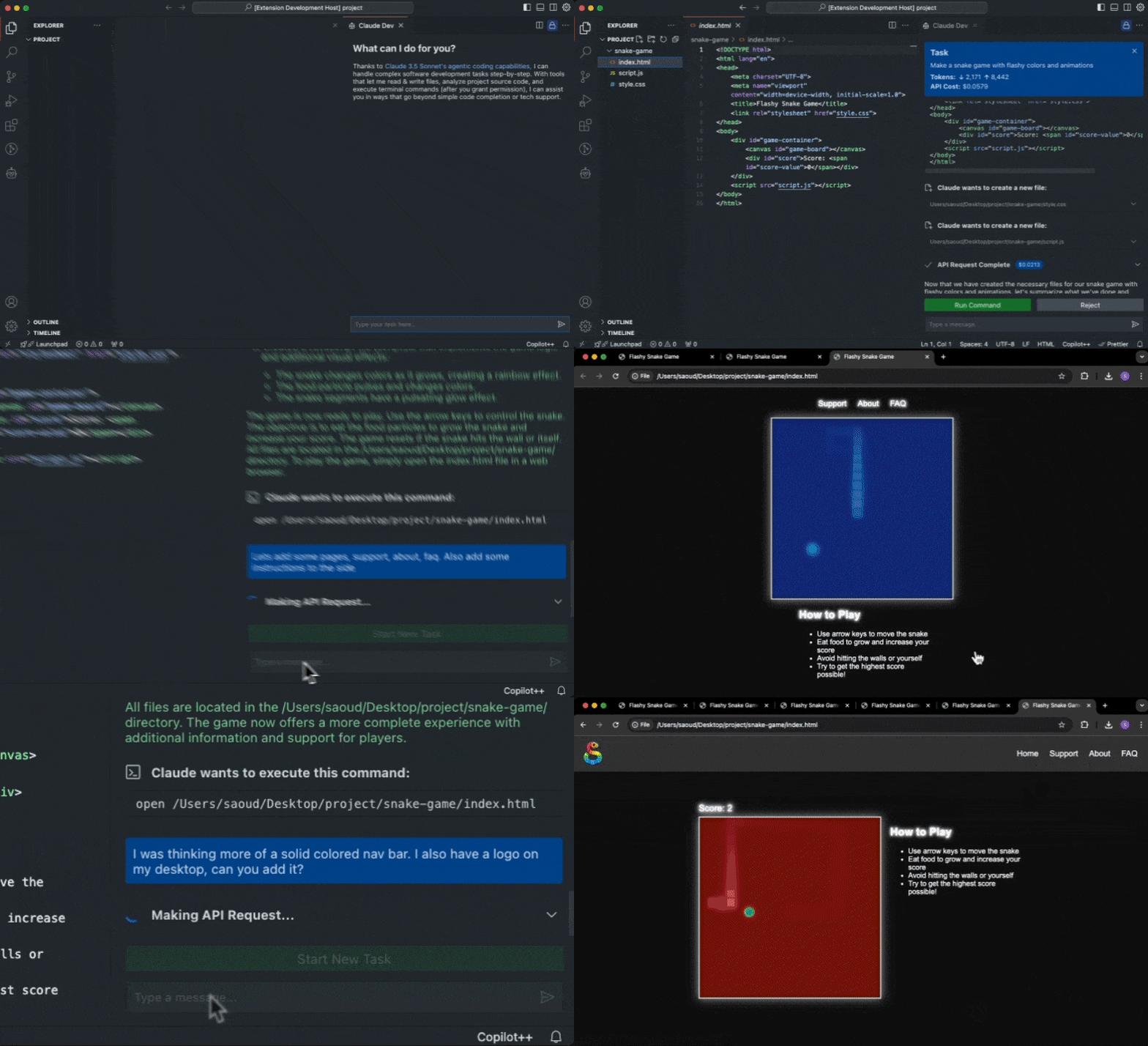
Thanks to Claude 3.5 Sonnet's agentic coding capabilities Claude Dev can handle complex software development tasks step-by-step. With tools that let him read & write files, analyze project source code, and execute terminal commands (after you grant permission), he can assist you in ways that go beyond simple code completion or tech support. From building software projects to running system operations, Claude Dev is only limited by your imagination.
While autonomous AI scripts traditionally run in sandboxed environments, Claude Dev offers a human-in-the-loop GUI to supervise every file change and command executed, providing a safe and accessible way to explore the potential of agentic AI.
- View syntax highlighted file previews and diffs for every change Claude makes
- Streams command execution output into the chat, so you never have to open a terminal yourself
- Presents permission buttons (i.e. 'Approve CLI command') before tool use or sending information to the API
- Keep track of total tokens and API usage cost for the entire task loop and individual requests
- Set a maximum # of API requests allowed for a task before being prompted for permission to proceed
- When a task is completed, Claude Dev determines if he can present the result to you with a CLI command like
open -a "Google Chrome" index.html, which you run with a click of a button
How it works
Claude Dev uses an agentic loop style implementation with chain-of-thought prompting and access to powerful tools that give him the ability to accomplish nearly any task. Start by providing a task and the agentic loop fires off, where it might use certain tools (with your permission) to accomplish each step in its thought process.
Tools
Claude Dev has access to the following capabilities:
execute_command: Execute CLI commands on the systemanalyze_project: Analyze the project's source code and file structurelist_files: List all file paths at the top level of the specified directoryread_file: Read the contents of a file at the specified pathwrite_to_file: Write content to a file at the specified pathask_followup_question: Ask the user a question to gather additional information needed to complete a taskattempt_completion: Present the result to the user after completing a task, potentially with a CLI command to kickoff a demonstration
Only With Your Permission
Claude always asks for your permission first before any tools are executed or information is sent back to the API. This puts you in control of this agentic loop, every step of the way.
Contribution
Feel free to contribute to this project by submitting issues and pull requests. Contributions are welcome and appreciated! To build Claude Dev locally, follow these steps:
- Clone the repository:
git clone https://github.com/saoudrizwan/claude-dev.git - Open the project in VSCode:
code claude-dev - Install the necessary dependencies for the extension and webview-gui:
npm run install:all - Launch by pressing
F5to open a new VSCode window with the extension loaded
Reviews
- "Claude Sonnet 3.5 Artifacts in VSCode With This Extension" by CoderOne
- "Meet Claude Dev — An Open-Source AI Programmer In VS Code" by Jim Clyde Monge
- "Code Smarter with Claude Dev: An AI Programmer for Your Projects" by Iana D.
- Claude Dev also hit top 10 posts of all time on r/ClaudeAI (thank you for all the lovely comments)
License
This project is licensed under the MIT License. See the LICENSE file for details.
Questions?
Contact me on twitter @sdrzn. Please create an issue if you come across a bug or would like a feature to be added.
Acknowledgments
Special thanks to Anthropic for providing the API that powers this extension.